




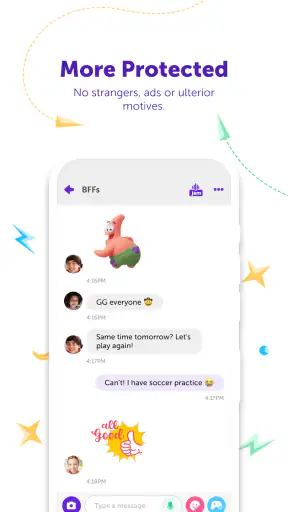

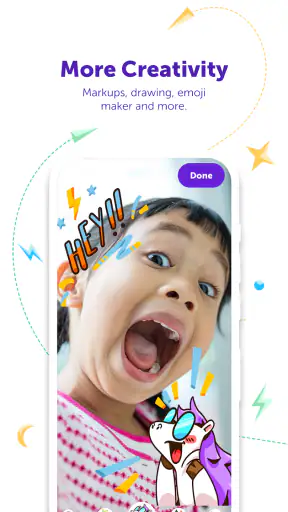


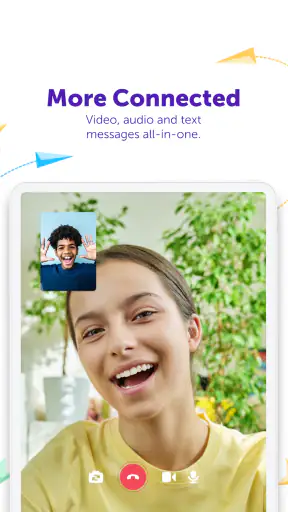
I approached Kinzoo: Fun All-Ages Messenger as a family communication app rather than another chat service to install and forget. Its basic promise is easy to understand: keep conversations with friends and family in one place, add video calls, and make messaging feel more playful through games and stories. That combination gives it a warmer personality than a plain text messenger, but it also raises an important question: does it remain useful after the first week of trying the extras?
My answer is mostly yes, provided the people you want to connect with are willing to use it too. Kinzoo is free, aimed at Everyone, and developed by Kinzoo Technologies Inc. It belongs in the social category, but its strongest identity is as a shared space for families and children rather than a general-purpose network for every kind of conversation. I found the best results came when I treated it as a small, intentional circle instead of trying to turn it into a replacement for every app on my phone.
What feels appealing during the first week
The first impression is deliberately approachable. A new user can understand the central activities quickly: send messages, make a video call, open a story, or try something interactive with a contact. That variety matters because family communication often fails for a simple reason: a child may not feel like typing, while an adult may not have time for a long call. Moving between a short message, a visual activity, and a conversation gives the app more ways to fit the moment.
I especially liked the idea of using it for low-pressure contact. A grandparent can receive a message without needing to join a complicated social feed, while a child can have a more engaging reason to open the conversation than a blank text box. The presence of stories and messenger games makes the exchange feel like an activity shared between people, not merely a stream of notifications.
That does not mean every feature has equal value for every household. If your family already communicates comfortably through a standard messenger, the novelty may be the main attraction at first. The games and stories need to support a real habit, such as a short evening check-in or a weekend call, or they can become decorative buttons that are opened once and ignored.
A useful way to begin is to invite only the people who will actually participate. Filling the app with distant contacts can make it feel like another inbox. A smaller group creates clearer expectations: who is available for calls, who enjoys sending stories, and which conversations are appropriate for quick messages. This is one of the less obvious strengths of a family-focused design: it works better when the social circle is curated rather than expanded for its own sake.
The app has also attracted meaningful adoption, with more than a million installs and an average rating of 4.7 from roughly 13 thousand ratings. Those figures suggest that the concept resonates with many users, although they do not remove the need to judge whether your own family will return to it. Social apps depend heavily on participation, and a highly rated empty conversation is still an empty conversation for a particular household.
Video calls that have a reason to happen
Video calling is more useful here when it is connected to the rest of the experience. A call can be the main event, but it can also follow a message or become a way to share a story together. In my view, that makes the feature more approachable for relatives who do not want to learn a separate video platform just to speak with a child.
There is a practical trade-off, though. People who need a fully established video-conferencing tool for work, large groups, or formal meetings should choose a dedicated alternative. Kinzoo makes more sense for familiar contacts and informal moments. Its appeal is not professional control; it is reducing the distance between a message and a shared family activity.
For an everyday example, imagine a parent finishing work while a child is already home. A short message can start the exchange, a quick call can handle the important part, and a game or story can give the child something more engaging than a routine “How was your day?” The value is not that every interaction becomes longer. It is that the app offers several natural stopping points, so the conversation can stay brief without feeling abrupt.
Why the playful layer matters
The games and stories are the feature most likely to create the first-week spark. They give children a reason to participate and give adults a prompt for interaction. That is more useful than an endless feed when the goal is to encourage direct contact between people who already know one another.
At the same time, I would not install Kinzoo solely for entertainment. A family that wants a large library, competitive progression, or a full gaming platform will probably find the experience too narrow. Its playful tools work best as conversation starters and shared diversions. The app earns its place when these activities help maintain relationships, not when they are expected to carry the entire product.
What remains useful from month to month
Long-term value comes from repetition without pressure. Kinzoo is strongest when it becomes the agreed-upon place for certain types of contact: a child sending a small update, relatives exchanging a story, or a family arranging a casual video call. That kind of routine is more durable than opening the app simply to see what is new.
I would describe it as a relationship-maintenance tool. It does not need to replace every message or call. Instead, it can provide a shared channel with a friendlier tone, especially where age differences make ordinary social apps uncomfortable. The all-ages positioning is important here because the same space can support a child’s simple message and an adult’s more involved conversation.
The recurring value also depends on matching the app to a specific rhythm. For example, a family could use it for a weekly story exchange, a short daily check-in, or occasional calls around a shared activity. The exact schedule matters less than having a reason to return. Without one, the app risks becoming a novelty destination that competes with established habits.
This is where Kinzoo differs from a typical social network. It is not most compelling when there is a constant supply of public content or strangers to follow. Its usefulness is tied to known contacts. That can feel refreshingly focused, but it also means the app cannot manufacture activity for you. The people you invite are the content, the audience, and the reason to come back.
I also see an advantage for households trying to keep children’s communication more intentional. A dedicated family messenger can make it easier to separate close relationships from the noisy, broad audience found on many social platforms. I would still expect adults to establish their own family rules about who joins conversations and how the app is used, but the narrower purpose makes those discussions easier to frame.
The cost and what to watch over time
The app is free to download and use, which lowers the barrier to testing it with a family group. It includes in-app purchases ranging from $0.99 to $49.99 per item, so I would check the purchase flow carefully before handing the device to a child. The presence of optional spending does not automatically make the app poor value, but it does mean that “free” should be understood as a starting point rather than a guarantee that every part of the experience has no cost.
My practical advice is to decide in advance whether the extra content is genuinely supporting your family’s routine. If a paid item becomes part of a repeated shared activity, it may feel worthwhile. If it is bought during a burst of excitement and then ignored, it adds expense without improving the habit. This is a small but important distinction for an app designed around recurring family use.
The app was released on January 10, 2020, and the current Android version is 9.6.7-Google-release86776. It supports Android 6.0 and later, which makes it accessible on a broad range of older devices. That is helpful for families where not everyone has a recent phone, although an older handset may still affect the comfort of video calls and media-heavy interactions in everyday use.
How much maintenance it demands
Kinzoo is not difficult to understand, but a social app still requires maintenance from the people using it. Someone has to keep the contact circle relevant, respond often enough to keep conversations alive, and decide how the games and stories fit into the household’s routine. The technical setup may be simple; the social setup is the part that determines whether the app lasts.
I recommend creating a clear purpose before inviting everyone. “This is where we share quick family updates” is more sustainable than “Let’s all use this new app.” A defined purpose reduces duplicated conversations and helps users know what belongs there. It also prevents the service from becoming another place where important messages are missed because the family is already active in several competing apps.
Parents and guardians should also be prepared to guide younger users through contact choices and spending decisions. The Everyone rating makes the app broadly approachable, but an age rating is not a substitute for family supervision. The most useful oversight is practical: keep the circle understandable, explain when video calls are appropriate, and check that purchases are intentional.
Another maintenance issue is device consistency. If one relative uses an older phone and another relies on a newer device, the experience may not feel identical. Kinzoo’s broad Android compatibility helps with access, yet families should still choose realistic activities. Short messages may work for everyone, while richer calls or interactive content may be better reserved for times when the relevant devices and connections are comfortable.
Where fatigue can appear
The main source of fatigue is duplication. If the same family already uses a familiar messenger, adding Kinzoo creates one more place to check. Its special features justify that extra step only when the group actually uses them. Otherwise, the app can feel like a second inbox wrapped in a more colorful interface.
There is also a novelty problem. Games and stories can attract attention quickly, but not every family wants communication to be playful all the time. Adults may prefer a direct message, while children may lose interest in an activity once it is no longer new. The app needs enough ordinary communication to remain useful after the entertainment layer has cooled.
Video calls can create a similar tension. They are valuable when both sides are ready to participate, but less convenient when a user only wants to send a quick update. Kinzoo works best when the family accepts that not every feature must be used in every interaction. Trying to turn every message into a call or every call into a game would make the experience feel like work.
Another limitation is scope. I would not choose it as my main tool for professional communication, broad community discussion, or conversations with people who are unlikely to install another app. A standard messenger remains better when compatibility with a large mixed audience is the priority. Kinzoo’s focused design is a strength for close family circles and a weakness for open-ended communication.
Who should make room for it
I think Kinzoo is a good fit for families who want a warmer alternative to plain messaging, particularly when children and relatives live apart. It is also appealing for people who value a contained social environment more than a public feed. The combination of chat, video calls, stories, and messenger games gives a family several ways to stay connected without requiring each person to become an enthusiast.
It is less suitable for someone who wants one universal messenger for every contact. If your friends and relatives already have a stable routine elsewhere, convincing them to move may be harder than the app’s feature set suggests. I would also skip it if you are looking for advanced collaboration, a professional calling platform, or a deep standalone games service.
Before installing it for a group, I would ask three practical questions. Will the people I care about actually join? Do we have a recurring reason to use the playful features? And are we comfortable managing optional purchases? If the answers are positive, the free entry point makes experimentation easy. If the answers are uncertain, the app may remain an attractive idea rather than a lasting habit.
Compared with ordinary messengers, Kinzoo offers more built-in prompts for family interaction and a more deliberately friendly atmosphere. Compared with full social networks, it is more focused and less dependent on public activity. Compared with dedicated video-call tools, it sacrifices breadth for a closer connection between calling and messaging. Those trade-offs are clear enough that choosing it becomes a matter of fit rather than a claim that it replaces everything else.
My long-term verdict
After the first-week excitement fades, the lasting value comes from the people and the routine, not from novelty alone. Kinzoo gives families a useful structure for staying in touch, and its games and stories can make contact easier to start. I appreciate that it supports different levels of participation: a quick message, a short call, or a more involved shared activity.
Its weaknesses are equally practical. A family must maintain the habit, avoid duplicating too many existing apps, and keep optional purchases under control. The playful features will not appeal equally to everyone, and users seeking a broad or professional communication platform should look elsewhere. These are not minor details; they determine whether the app becomes part of daily life or disappears after installation.
For me, it earns lasting space when a family uses it with a simple plan: keep the circle small, give conversations a clear purpose, and let the games or stories support real relationships rather than replace them. The strong rating and wide install base make it worth considering, but the more convincing reason to try it is personal: if your family needs a gentler, more engaging way to keep in contact, this app has a sensible place in that routine.
My recommendation is to start with the free experience, invite the people who will genuinely participate, and judge it after the initial excitement has passed. If messages, calls, and shared activities still happen naturally, Kinzoo is doing something valuable. If everyone returns to another messenger and the extras stay untouched, keeping one more social app installed is probably not worth the maintenance.


